Abstract
An important engineering application of computer science is numerical analysis. This lecture introduces estimation using Monte Carlo simulations and basic linear algebra for solving multiple linear equations. Readers will learn to use NumPy arrays instead of lists to implement numerical analysis efficiently, incorporating the concepts of universal functions and broadcasting.
import math
import random

import ipywidgets as widgets
import numpy as np
import matplotlib.pyplot as plt

%matplotlib widget
Monte Carlo simulation
What is Monte Carlo simulation?
It is a statistical method named after a Casino in Monaco:
I suggested an obvious name for the statistical method — a suggestion not unrelated to the fact that Stan had an uncle who would borrow money from relatives because he “just had to go to Monte Carlo.”
(N. Metropolis, “The Beginning of the Monte Carlo Method.”)
It would be nice to simulate the casino so Ulam’s uncle did not need to borrow money to play in the casino.
Actually,
Monte Carlo is the code name of the secret project for creating the hydrogen bomb.
Nicholas Metropolis and Stan Ulam worked with John von Neumann to program the first electronic computer ENIAC to simulate a computational model of a thermonuclear reaction.
As a simple illustration, we will compute the value of :
math.pi3.141592653589793Instead of using pi from math, can we compute directly? Consider a seemingly unrelated math problem:
What is the chance a random point in a square lies in the inscribed circle?

Uniformly random points in a square. Green (Red) points are inside (outside) the inscribed circle. (source code)
By relating the chance of a random event to the quantity we want to compute, we can compute the quantity by simulating the random event. This method is called the Monte Carlo simulation:
def approximate_pi(n):
    ### BEGIN SOLUTION
    return (
        4
        * len(
            [True for i in range(n) if random.random() ** 2 + random.random() ** 2 < 1]
        )
        / n
    )
    ### END SOLUTION
%%timeit -n 1 -r 1
print(f"Approximate: {approximate_pi(10**7)}\nGround truth: {math.pi}")Approximate: 3.1427156
Ground truth: 3.141592653589793
1.84 s ± 0 ns per loop (mean ± std. dev. of 1 run, 1 loop each)
How accurate is the approximation?
The following uses a powerful library NumPy to return a -confidence interval.
def np_approximate_pi(n):
    in_circle = (np.random.random((n, 2)) ** 2).sum(axis=-1) < 1
    mean = 4 * in_circle.mean()
    std = 4 * in_circle.std() / n ** 0.5
    return np.array([mean - 2 * std, mean + 2 * std])
%%timeit -n 1 -r 1
interval = np_approximate_pi(10**7)
print(
f"""95%-confidence interval: {interval}
Estimate: {interval.mean():.4f} ± {(interval[1]-interval[0])/2:.4f}
Ground truth: {math.pi}"""
)95%-confidence interval: [3.13931725 3.14139555]
Estimate: 3.1404 ± 0.0010
Ground truth: 3.141592653589793
435 ms ± 0 ns per loop (mean ± std. dev. of 1 run, 1 loop each)
Is NumPy faster?
The computation done using NumPy is over 5 times faster despite the additional computation of the standard deviation.
We can increase further to obtain a more accurate solution:
interval = np_approximate_pi(10**8)
print(
    f"""95%-confidence interval: {interval}
Estimate: {interval.mean():.4f} ± {(interval[1]-interval[0])/2:.4f}
Ground truth: {math.pi}"""
)
95%-confidence interval: [3.14123024 3.14188712]
Estimate: 3.1416 ± 0.0003
Ground truth: 3.141592653589793
%%hermes --no-context
Write a Python program `print_pi(n)` to print pi to `n` decimal places.
Avoid the precision limit of float.🌿 Fork/new: main (will create on click)
See Also
from decimal import Decimal, localcontext, ROUND_HALF_EVEN

def print_pi(n: int) -> None:
    """
    Prints π to the requested number of decimal places.
    Uses the Machin-like formula  π = 16·atan(1/5) – 4·atan(1/239)
    so no floating‑point inaccuracies appear.

    Parameters
    ----------
    n : int
        Number of decimal places to print (>= 0).
    """
    if n < 0:
        raise ValueError("n must be a non‑negative integer")

    # ------------------------------------------------------------------
    # Helper: high‑precision arctan(x) using the Taylor series
    # ------------------------------------------------------------------
    def _arctan(x: Decimal) -> Decimal:
        """
        Compute atan(x) for |x| <= 1/5 using the series
        atan(x) = x − x³/3 + x⁵/5 − ….
        """
        term = x               # Current term in the series
        total = term           # Sum of terms so far
        k = 1                  # Index of the term

        # How small does a term need to be before we can stop?
        # We stop when its absolute value is < 10^-(n+5)
        stop_at = Decimal(1) / (Decimal(10) ** (n + 5))

        while abs(term) > stop_at:
            # Next term:    -term * x² * (2k-1) / (2k+1)
            term = -term * x * x * (2 * k - 1) / (2 * k + 1)
            total += term
            k += 1

        return total

    # ------------------------------------------------------------------
    # Compute π
    # ------------------------------------------------------------------
    with localcontext() as ctx:
        # Use a few extra digits so rounding at the end is correct
        ctx.prec = n + 10
        pi = 16 * _arctan(Decimal(1) / 5) - 4 * _arctan(Decimal(1) / 239)

    # ------------------------------------------------------------------
    # Output
    # ------------------------------------------------------------------
    if n == 0:                     # just the integer part
        print(int(pi))
    else:
        # Round π to exactly n decimal places
        quant = Decimal('1.' + '0' * n)
        pi = pi.quantize(quant, rounding=ROUND_HALF_EVEN)
        print(str(pi))

# ------------------------------------------------------------------
# Example usage
# ------------------------------------------------------------------
if __name__ == "__main__":
    print_pi(0)   # 3
    print_pi(5)   # 3.14159
    print_pi(10)  # 3.1415926535
    print_pi(50)  # 50 decimal places of π
How it works
Arctangent series – The function
_arctanevaluatesatan(x) = x – x^3/3 + x^5/5 – …for|x| ≤ 1/5.
Because1/5is small, the series converges very quickly, so only a handful of terms are required to reach the requested precision.Machin‑like formula –
π can be expressed asπ = 16 · atan(1/5) – 4 · atan(1/239).
This eliminates the need for a slow series for π itself.Decimal arithmetic – All computations use Python’s
decimal.Decimal, which scales to whatever precision we choose. A safety margin of 10 extra digits (n + 10) protects against rounding errors when the final quantisation occurs.Output – For
n = 0only the integer part is printed. Otherwisepiis quantised to exactlyndecimal places and printed as a string.
This program works for any non‑negative integer n (subject to memory and
time limits of the running environment).
%%hermes --no-context
In a paragraph or two, provide an example of an application where Monte Carlo
simulation is the only feasible computational method and no superior
alternatives are known.🌿 Fork/new: main (will create on click)
See Also
Neutron transport in a full‑physics nuclear reactor core
Computing the neutron flux in a commercial reactor core requires solving the Boltzmann transport equation in six‑dimensional phase space (three spatial coordinates, two angular directions, and energy) while accounting for highly heterogeneous geometry, detailed material composition, and energy‑dependent scattering and absorption. Deterministic schemes (e.g., SNC, PN, or lattice tallies) become prohibitively expensive because the required discretisation of the 6‑D domain leads to billions of cells, and the complex geometry creates severe ray‑crashing and cell‑sharing issues that render standard quadrature or finite‑volume techniques inaccurate or unstable. In practice the only scalable approach capable of producing fully 3‑D, comprehensive, and experimentally validated results is the Monte Carlo method, wherein neutron histories are sampled from the exact probability densities given by the underlying physics. Modern algorithms such as continuous‑energy Monte Carlo with importance sampling, variance‑reduction techniques, and parallel execution on GPU/CPU clusters allow for accurate solutions with controllable statistical uncertainty.
Why no superior alternative is known
Despite decades of research into deterministic transport solvers, no proven method routinely matches the Monte Carlo approach in both accuracy and computational tractability for such complex, highly coupled, and stochastic problems. The stiffness and nonlinearity of the nuclear physics, combined with the need to model subtle effects (e.g., delayed neutrons, temperature feedbacks, and micro‑geometry of fuel pins), preclude an analytical or deterministic discretisation that is both robust and efficient. Consequently, Monte Carlo simulation remains the only feasible, systematically improvable computational technique for reactor‑core neutron transport, and no competing method with guaranteed superior performance is currently known.
%%hermes --no-context
Explain in a paragraph or two how the accuracy of the estimates by Monte Carlo
simulation can be improved by importance sampling?🌿 Fork/new: main (will create on click)
See Also
Linear Algebra
How to solve a linear equation?
Given the following linear equation in variable with real-valued coefficient and ,
what is the value of that satisfies the equation?
def solve_linear_equation(a, b):
    ### BEGIN SOLUTION
    return b / a if a != 0 else None
    ### END SOLUTION


@widgets.interact(a=(0, 5, 1), b=(0, 5, 1))
def linear_equation_solver(a=2, b=3):
    print(
        f"""linear equation: {a}x = {b}
       solution: x = {solve_linear_equation(a,b)}"""
    )
linear equation: 2x = 3
solution: x = 1.5
How to solve multiple linear equations?
In the general case, we have a system of linear equations and variables:
where
for are the variables, and
and for and are the coefficients.
A fundamental problem in linear algebra is to compute the unique solution to the system if it exists.
We will consider the simpler 2-by-2 system with 2 variables and 2 equations:
To get an idea of the solution, suppose
The system of equations becomes
which gives the solution directly.
What about instead?
To obtain the solution, we divide both equations by 2:
What if instead?
The second equation gives the solution of , and we can use the solution in the first equation to solve for . More precisely:
Subtract the second equation from the first one:
Divide both equations by 2:
The above operations are called row operations in linear algebra: Each row is an equation.
How to write a program to solve a general 2-by-2 system? We will use the NumPy library.
Creating NumPy arrays
How to store the coefficients?
In linear algebra, a system of equations such as
is written concisely in matrix form as :
where is the matrix multiplication
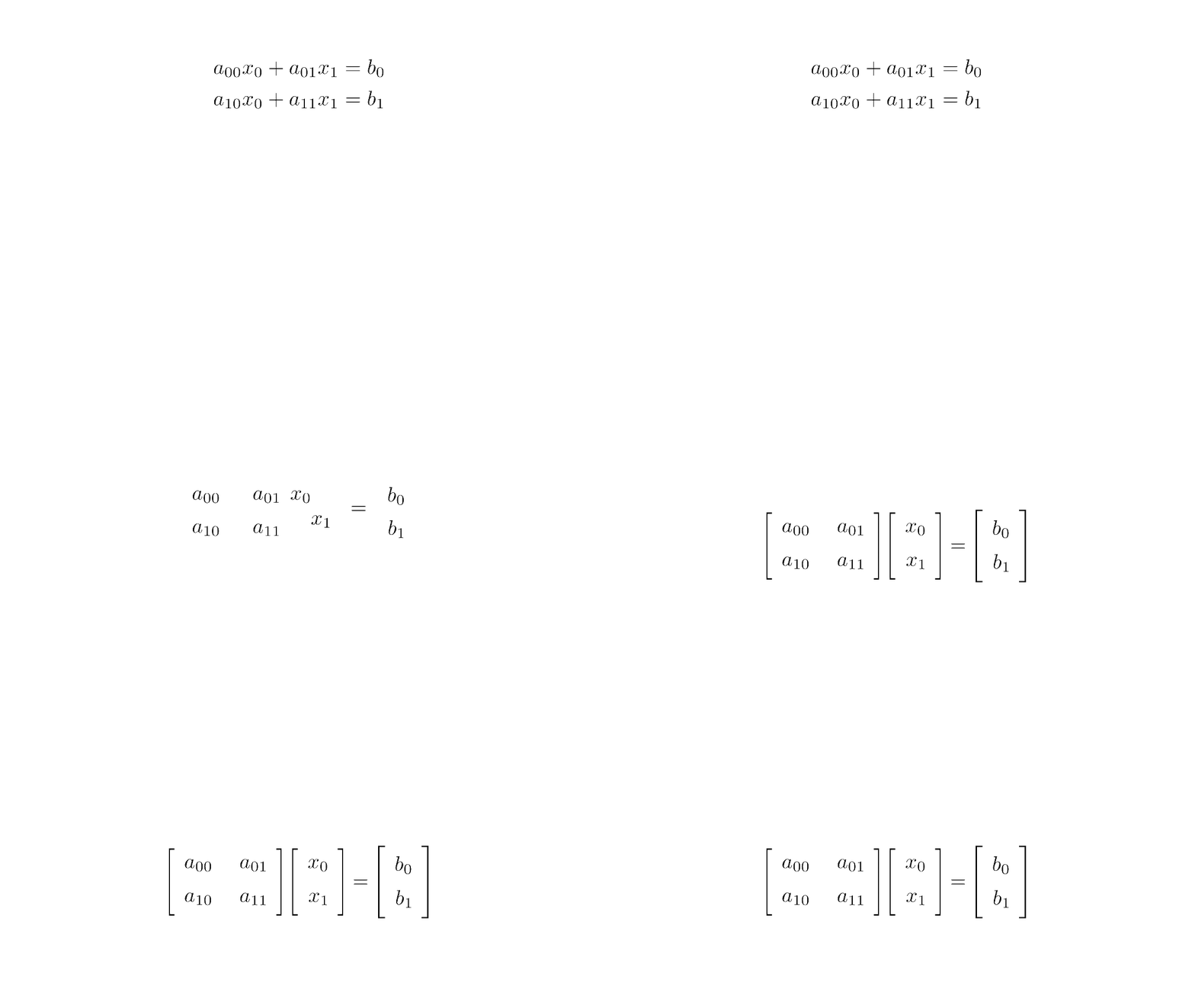
Matrix form (source code)
We say that is a matrix and its dimension/shape is 2-by-2:
The first dimension/axis has size 2. We also say that the matrix has 2 rows.
The second dimension/axis has size 2. We also say that the matrix has 2 columns. and are called column vectors, which are matrices with one column.
Instead of using list to store the matrix, we will use a NumPy array.
A = np.array([[2.0, 2], [0, 2]])
b = np.array([1.0, 1])
A, b
(array([[2., 2.],
[0., 2.]]),
array([1., 1.]))Compared to list, NumPy array is often more efficient and has more attributes.
array_attributes = set(attr for attr in dir(np.array([])) if attr[0] != "_")
list_attributes = set(attr for attr in dir(list) if attr[0] != "_")
print("\nCommon attributes:\n", *(array_attributes & list_attributes))
print("\nArray-specific attributes:\n", *(array_attributes - list_attributes))
print("\nList-specific attributes:\n", *(list_attributes - array_attributes))
Common attributes:
 sort copy

Array-specific attributes:
 clip itemsize tofile nbytes T std nonzero sum dot choose diagonal reshape shape transpose max any dtype fill setflags ndim argpartition astype argmin flatten conj swapaxes strides take cumsum flags mean item round dumps setfield argsort compress prod tolist conjugate getfield view flat min put searchsorted device mT to_device resize repeat argmax base data byteswap ctypes partition real var size all ravel dump tobytes squeeze cumprod trace imag

List-specific attributes:
 remove index clear insert pop reverse extend append count
The following attributes give the dimension/shape, number of dimensions, size, and data type.
for array in A, b:
    print(
        f"""{array}
    shape: {array.shape}
    ndim: {array.ndim}
    size: {array.size}
    dtype: {array.dtype}
    """
    )
[[2. 2.]
[0. 2.]]
shape: (2, 2)
ndim: 2
size: 4
dtype: float64
[1. 1.]
shape: (2,)
ndim: 1
size: 2
dtype: float64
Note that the function len only returns the size of the first dimension:
assert A.shape[0] == len(A)
len(A)2Unlike list, every NumPy array has a data type. For efficient computation/storage, NumPy implements different data types with different storage sizes:
np.byte, np.short, np.intc
np.ubyte, np.ushort, np.uintc, np.uint
np.half, np.single, np.double, np.longdouble
np.csingle, np.cdouble, np.clongdouble
(numpy.complex64, numpy.complex128, numpy.clongdouble)E.g., int64 is the 64-bit integer. Unlike Python’s unbounded int, int64 has a fixed, limited range.
%%pytutor
min_int64 = np.int64(-2**63)
max_int64 = np.int64(2**63-1)
np.int64(2 ** 63) # overflow errorWe can use the astype method to convert the data type:
A_int64 = A.astype(int)  # converts to int64 by default
A_float32 = A.astype(np.float32)  # converts to float32
for array in A_int64, A_float32:
    print(array, array.dtype)
[[2 2]
[0 2]] int64
[[2. 2.]
[0. 2.]] float32
We must be careful about assigning items of different types to an array.
A_int64[0, 0] = 1
print(A_int64)
A_int64[0, 0] = 0.5
print(A_int64)  # intended assignment fails
np.array([int(1), float(1)])  # will be all floating point numbers
[[1 2]
[0 2]]
[[0 2]
[0 2]]
array([1., 1.])### BEGIN SOLUTION
heterogeneous_np_array = np.array([*range(3), *"abc"], dtype=object)
### END SOLUTION
heterogeneous_np_arrayarray([0, 1, 2, 'a', 'b', 'c'], dtype=object)Be careful when creating arrays of tuple/list:
%%pytutor
a1 = np.array([(1, 2), [3, 4, 5]], dtype=object)
print(a1.shape, a1.size)
a2 = np.array([(1, 2), [3, 4]], dtype=object)
print(a2.shape, a2.size)NumPy provides many functions to create an array:
%%pytutor
a = [np.zeros(0)]
a.append(np.zeros(1, dtype=int))
a.append(np.zeros((2, 3, 4)))%%pytutor
a = [np.empty(2)]
a.append(np.empty((2, 3, 4),
dtype=int))%%pytutor
a = [np.ones(2)]
a.append(np.ones((2, 3, 4),
dtype=int))%%pytutor
a = [np.eye(2)]
a.append(np.eye(3, dtype=int))%%pytutor
a = [np.diag(range(1))]
a.append(np.diag(range(2)))
a.append(np.diag(np.ones(3), k=1))
# 1 above main diagonalNumPy also provides functions to build an array using rules.
%%pytutor
a = [np.arange(5)]
# like range but allow non-integer parameters
a.append(np.arange(2.5, 5, 0.5))%%pytutor
# can specify the number of points instead of the step size
a = [np.linspace(0, 4, 5)]
a.append(np.linspace(2.5, 4.5, 5))%%pytutor
a = np.fromfunction(lambda i, j: i * j, (3, 4))We can also reshape an array using the reshape method/function:
%%pytutor
a = np.arange(2 * 3 * 4)
c1 = a.reshape(2, 3, 4)
# automatically calculate the size specified as `-1`
c2 = a.reshape(2, 3, -1)%%pytutor
a = np.arange(2 * 3 * 4)
# default C ordering
c = a.reshape((2, 3, -1), order="C")
# F ordering
f = a.reshape((2, 3, -1), order="F")The C ordering and F ordering can be implemented using list comprehension:
%%pytutor
a = np.arange(2 * 3 * 4)
# last axis index changes fastest
c = np.array(
    [[[a[i*3*4+j*4+k]
       for k in range(4)]
      for j in range(3)]
     for i in range(2)])
# first axis index changes fastest
f = np.array(
    [[[a[i+j*2+k*3*2]
       for k in range(4)]
      for j in range(3)]
for i in range(2)])ravel is a particular case of reshaping an array to one dimension.
A similar function flatten returns a copy of the array but ravel and reshape return a dynamic view whenever possible.
array = np.arange(2 * 3 * 4).reshape(2, 3, 4)
array, array.ravel(), array.reshape(-1), array.ravel(order="F")
(array([[[ 0, 1, 2, 3],
[ 4, 5, 6, 7],
[ 8, 9, 10, 11]],
[[12, 13, 14, 15],
[16, 17, 18, 19],
[20, 21, 22, 23]]]),
array([ 0, 1, 2, 3, 4, 5, 6, 7, 8, 9, 10, 11, 12, 13, 14, 15, 16,
17, 18, 19, 20, 21, 22, 23]),
array([ 0, 1, 2, 3, 4, 5, 6, 7, 8, 9, 10, 11, 12, 13, 14, 15, 16,
17, 18, 19, 20, 21, 22, 23]),
array([ 0, 12, 4, 16, 8, 20, 1, 13, 5, 17, 9, 21, 2, 14, 6, 18, 10,
22, 3, 15, 7, 19, 11, 23]))def print_array_entries_line_by_line(array):
### BEGIN SOLUTION
for i in array.flatten():
print(i)
### END SOLUTION
print_array_entries_line_by_line(np.arange(2 * 3 * 4).reshape(2, 3, 4))Operating on arrays
How to verify the solution of a system of linear equations?
Before solving the system of linear equations, let us try to verify a solution to the equations:
NumPy provides the function matmul and the operator @ for matrix multiplication.
print(np.matmul(A, np.array([0, 0])) == b)
print(A @ np.array([0, 0.5]) == b)
[False False]
[ True True]
Note that the comparison on NumPy arrays returns a boolean array instead of a boolean value, unlike the comparison operations on lists.
To check whether all items are true, we use the all method.
print((np.matmul(A, np.array([0, 0])) == b).all())
print((A @ np.array([0, 0.5]) == b).all())
False
True
How to concatenate arrays?
We will operate on an augmented matrix of the coefficients:
NumPy provides functions to create block matrices:
np.block?
C = np.block([A, b.reshape(-1, 1)])  # reshape to ensure same ndim
C
array([[2., 2., 1.],
[0., 2., 1.]])To stack an array along different axes:
array = np.arange(1 * 2 * 3).reshape(1, 2, 3)
for concat_array in [
    array,
    np.hstack((array, array)),  # stack along the second axis with index 1
    np.vstack((array, array)),  # stack along the first axis with index 0
    np.concatenate((array, array), axis=-1),  # last axis
    np.stack((array, array), axis=0),
]:  # new axis
    print(concat_array, "\nshape:", concat_array.shape)
[[[0 1 2]
[3 4 5]]]
shape: (1, 2, 3)
[[[0 1 2]
[3 4 5]
[0 1 2]
[3 4 5]]]
shape: (1, 4, 3)
[[[0 1 2]
[3 4 5]]
[[0 1 2]
[3 4 5]]]
shape: (2, 2, 3)
[[[0 1 2 0 1 2]
[3 4 5 3 4 5]]]
shape: (1, 2, 6)
[[[[0 1 2]
[3 4 5]]]
[[[0 1 2]
[3 4 5]]]]
shape: (2, 1, 2, 3)
How to perform arithmetic operations on a NumPy array?
To divide all the coefficients by 2, we can write:
D = C / 2
D
array([[1. , 1. , 0.5],
[0. , 1. , 0.5]])Note that the above does not work for list.
%%pytutor
[[2, 2, 1], [0, 2, 1]] / 2Arithmetic operations on NumPy arrays apply if the arrays have compatible dimensions. Two dimensions are compatible when
they are equal, except for
components equal to 1.
NumPy uses broadcasting
rules
to stretch the axis of size 1 up to match the corresponding axis in other
arrays. C / 2 is an example where the second operand 2 is broadcasted to a
2-by-2 matrix before the elementwise division. Another example is as
follows.
three_by_one = np.arange(3).reshape(3, 1)
one_by_four = np.arange(4).reshape(1, 4)
print(
    f"""
{three_by_one}
*
{one_by_four}
==
{three_by_one * one_by_four}
"""
)
[[0]
 [1]
 [2]]
*
[[0 1 2 3]]
==
[[0 0 0 0]
 [0 1 2 3]
 [0 2 4 6]]
%%hermes --no-context
Explain the broadcasting rule intuitively in one paragraph using an analogy.See Also
Broadcasting rule – think of it as a playlist sync in a party playlist app.
Imagine you have two lists of songs: one list is for the whole party (the array), and the other is a set of turn‑tables that each DJ plays on (the operands). If a DJ has only one song in their list, the app keeps repeating that track to fill the dance floor; if the list is shorter, the app loops it until all seats are covered. Conversely, if the DJ’s list is longer, the app repeats the entire party playlist in a “mirror” fashion until both lists line up in length. This way, no matter the sizes of the original lists, the app automatically stretches or repeats the shorter ones to match the longer ones, so every seat receives a song from both lists—a bit like how NumPy automatically expands dimensions during element‑wise operations to make the shapes compatible without you having to rewrite the data.
Solution to Exercise 5 #
NumPy arrays provide efficient numerical operations:
a = np.array([1, 2, 3, 4, 5])
b = np.array([10, 20, 30, 40, 50])
print(a + b)   # element-wise: [11 22 33 44 55]
print(a * 2)   # scalar multiply: [2 4 6 8 10]
print(np.dot(a, b))  # dot product: 350
Evaluation points:
Element-wise operations (
+,*) work on arrays directly.np.dot()or@operator computes the dot product.NumPy uses contiguous C memory (dtype like
float64), making it much faster than Python lists for numerical work.Broadcasting allows operations on arrays of different shapes.
Universal functions (ufuncs) like
np.sin,np.expoperate element-wise in compiled C code.
Next, to subtract the second row of the coefficients from the first row:
D[0, :] = D[0, :] - D[1, :]
D
array([[1. , 0. , 0. ],
[0. , 1. , 0.5]])Notice the use of commas to index different dimensions instead of using multiple brackets:
assert (D[0][:] == D[0, :]).all()Using this indexing technique, it is easy to extract the last column as the solution to the system of linear equations:
x = D[:, -1]
x
array([0. , 0.5])This gives the desired solution and for
NumPy provides many convenient ways to index an array.
B = np.arange(2 * 3).reshape(2, 3)
B, B[(0, 1), (2, 0)]  # selecting the corners using integer array
(array([[0, 1, 2],
[3, 4, 5]]),
array([2, 3]))B = np.arange(2 * 3 * 4).reshape(2, 3, 4)
B, B[0], B[0, (1, 2)], B[0, (1, 2), (2, 3)], B[
:, (1, 2), (2, 3)
] # pay attention to the last two cases(array([[[ 0, 1, 2, 3],
[ 4, 5, 6, 7],
[ 8, 9, 10, 11]],
[[12, 13, 14, 15],
[16, 17, 18, 19],
[20, 21, 22, 23]]]),
array([[ 0, 1, 2, 3],
[ 4, 5, 6, 7],
[ 8, 9, 10, 11]]),
array([[ 4, 5, 6, 7],
[ 8, 9, 10, 11]]),
array([ 6, 11]),
array([[ 6, 11],
[18, 23]]))assert (B[..., -1] == B[:, :, -1]).all()
B[..., -1] # ... expands to selecting all elements of all previous dimensionsarray([[ 3, 7, 11],
[15, 19, 23]])B[B > 5] # indexing using boolean arrayarray([ 6, 7, 8, 9, 10, 11, 12, 13, 14, 15, 16, 17, 18, 19, 20, 21, 22,
23])Finally, the following function solves 2 linear equations with 2 variables.
def solve_2_by_2_system(A, b):
    """Returns the unique solution of the linear system, if exists,
    else returns None."""
    C = np.hstack((A, b.reshape(-1, 1)))
    if C[0, 0] == 0:
        C = C[(1, 0), :]
    if C[0, 0] == 0:
        return None
    C[0, :] = C[0, :] / C[0, 0]
    C[1, :] = C[1, :] - C[0, :] * C[1, 0]
    if C[1, 1] == 0:
        return None
    C[1, :] = C[1, :] / C[1, 1]
    C[0, :] = C[0, :] - C[1, :] * C[0, 1]
    return C[:, -1]
# tests
for A in (
np.eye(2),
np.ones((2, 2)),
np.stack((np.ones(2), np.zeros(2))),
np.stack((np.ones(2), np.zeros(2)), axis=1),
):
print(f"A={A}\nb={b}\nx={solve_2_by_2_system(A,b)}\n")A=[[1. 0.]
[0. 1.]]
b=[1. 1.]
x=[1. 1.]
A=[[1. 1.]
[1. 1.]]
b=[1. 1.]
x=None
A=[[1. 1.]
[0. 0.]]
b=[1. 1.]
x=None
A=[[1. 0.]
[1. 0.]]
b=[1. 1.]
x=None
Universal functions
NumPy implements universal/vectorized functions/operators that take arrays as arguments and perform operations with appropriate broadcasting rules. The following is an example that uses the universal function np.sin:
@widgets.interact(a=(0, 5, 1), b=(-1, 1, 0.1))
def plot_sin(a=1, b=0):
    plt.figure(1, clear=True)
    plt.title(r"$\sin(ax+b\pi)$")
    plt.xlabel(r"$x$ (radian)")
    x = np.linspace(0, 2 * math.pi)
    plt.plot(x, np.sin(a * x + b * math.pi))  # np.sin, *, + are universal functions
plt.show()In addition to making the code shorter, universal functions are both efficient and flexible. Recall the Monte Carlo simulation to approximate :
Solution to Exercise 6
random.randomgenerates a numpy array for points in the unit square randomly.sumsums up the element along the last axis to give the squared distance.<returns the boolean array indicating whether each point is in the first quadrant of the inscribed circle.meanandstdreturns the mean and standard deviation of the boolean array with True and False interpreted as 1 and 0, respectively.
%%hermes --no-context
Explain in a paragraph why universal functions in numpy are far more efficient
than applying a function to each element of a list individually.See Also
NumPy universal functions (ufuncs) are far more efficient than applying a Python function element‑by‑element to a list because they outsource the entire element‑wise loop to compiled, tightly‑optimized C/Fortran code that runs inside a single process. A ufunc operates on contiguous blocks of memory, so data can be fetched in large chunks that fit in CPU caches, minimizing load/store latency; it can also exploit SIMD (single‑instruction, multiple‑data) instructions to process several array elements in one operation. Moreover, because the Python interpreter isn’t invoked for each element, there is no byte‑code dispatch, argument creation or reference‑counting overhead, which would otherwise dominate when dozens of thousands or millions of function calls are made. In short, ufuncs trade the granularity of Python for a CPU‑friendly bulk operation, dramatically reducing both instruction count and memory traffic.
- Metropolis, N., & Ulam, S. (1949). The Monte Carlo Method. Journal of the American Statistical Association, 44(247), 335–341. 10.1080/01621459.1949.10483310