Abstract
This notebook explains how to read and write basic Python expressions for arithmetic operations. Much like mathematical expressions, the precise meanings of Python expressions must consider the precedence and associativity of the operators.
import ast  # for AST
import sys
from dis import dis
from ipywidgets import interact, fixed
Floating Point Numbers
Not all numbers are integers. In Engineering, we often need to use fractions.
How to enter fractions in a program?
x = -0.1  # decimal number
y = -1.0e-1  # scientific notation
z = -1 / 10  # fraction
x, y, z, type(x), type(y), type(z)
(-0.1, -0.1, -0.1, float, float, float)What is the type float?
Numbers of type float are stored in memory using the floating point representation, which is similar to scientific notation:
How is a float represented in binary?
float represented in binary?An efficient implementation is more complicated. Try the IEEE-754 Floating Point Converter for single-precision floating point number:
Starting from the number 0, click the button
+1to find the smallest positive number.Find the largest and smallest representable floating point numbers.
Integers in mathematics may be regarded as a float instead of int:
type(1.0), type(1e2)(float, float)You can also convert an int or a str to a float.
float(1), float("1")(1.0, 1.0)Is it better to store an integer as float?
Python stores a floating point with finite precision, usually 64-bit/double precision:
sys.float_infosys.float_info(max=1.7976931348623157e+308, max_exp=1024, max_10_exp=308, min=2.2250738585072014e-308, min_exp=-1021, min_10_exp=-307, dig=15, mant_dig=53, epsilon=2.220446049250313e-16, radix=2, rounds=1)It cannot accurately represent a number larger than the max:
sys.float_info.max * 2infThe precision also affects the check for equality.
(
    1.0 == 1.0 + sys.float_info.epsilon * 0.5,  # returns true if equal
    1.0 == 1.0 + sys.float_info.epsilon * 0.6,
    sys.float_info.max + 1 == sys.float_info.max,
)
(True, False, True)Another issue with float is that it may show more decimal places than desired.
1 / 30.3333333333333333%%hermes --no-context
Why does 0.1 + 0.2 not equal 0.3 in Python? Explain in one paragraph
using an analogy.How to round a floating point number to the desired number of decimal places?
round(2.665, 2), round(2.675, 2)(2.67, 2.67)Why 2.675 rounds to 2.67 instead of 2.68?
A
floatis actually represented in binary.A decimal fraction may not be represented exactly in binary.
Solution to Exercise 1 #
The value stored is 2.6749999523162841796875, which explains why it is rounded to 2.67 instead of 2.68.
The round function can also be applied to an integer.
round(150, -2), round(250, -2)(200, 200)Why 250 rounds to 200 instead of 300?
Python 3 implements the default rounding method in IEEE 754.
%%hermes --no-context
Explain in one paragraph how arbitrary precision arithmetic works in a
computer despite the memory being finite. If we can have arbitrary
precision arithmetic, why do we need `float`?↻ Session: main (ACP: 65e8c84b-751…)
See Also
Arbitrary precision arithmetic works by representing numbers as dynamically-sized arrays of digits (typically in base 2^32), allocating more memory as needed to store additional digits — so while memory is finite, the precision is limited only by how much RAM you’re willing to spend, not by a fixed bit width. You still need float because arbitrary precision integers are slow (software-implemented array operations instead of single CPU instructions) and cannot represent non-terminating fractions like 1/3 or irrationals like π at all; float (IEEE 754) trades exactness for fixed-speed, hardware-accelerated computation with a predictable memory footprint, which matters enormously when you’re doing millions of operations in scientific computing or graphics where approximate results are acceptable.
Operators
The following are common operators you can use to form an expression in Python:
| Operator | Operation | Example |
|---|---|---|
unary - | Negation | -y |
+ | Addition | x + y |
- | Subtraction | x - y |
* | Multiplication | x*y |
/ | Division | x/y |
xandyin the examples are called the left and right operands respectively.The first operator is a unary operator, which operates on just one operand.[1]
All other operators are binary operators, which operate on two operands.
Python also supports other operations such as
| Operator | Operation | Example |
|---|---|---|
// | Integer division | x//y |
% | Modulo | x%y |
** | Exponentiation | x**y |
The following demonstrates the operations of binary operators:
binary_operators = {
    "+": " + ",
    "-": " - ",
    "*": "*",
    "/": "/",
    "//": "//",
    "%": "%",
    "**": "**",
}


@interact(operand1=r"10", operator=binary_operators, operand2=r"3")
def binary_operation(operand1, operator, operand2):
    expression = f"{operand1}{operator}{operand2}"
    value = eval(expression)
    print(
        f"""{'Expression:':>11} {expression}\n{'Value:':>11} {value}\n{'Type:':>11} {type(value)}"""
)%%hermes --no-context
Give a real-world example where the modulo operator (%) is useful
in programming.↻ Session: main (ACP: 65e8c84b-751…)
See Also
A common real-world example is cycling through a fixed-size buffer (round-robin) — for instance, a load balancer distributing requests across 3 servers: server = request_number % 3 cycles through servers 0, 1, 2, 0, 1, 2, … forever. Modulo is also everywhere in time conversions (seconds % 60 gives seconds within a minute), calendar logic, checksums, and detecting even/odd numbers.
Solution to Exercise 2
/is the usual division, and so10/3returns the floating-point number .//is integer division, and so10//3gives the integer quotient 3.
Solution to Exercise 3 #
The first expression means concatenating
'abc'three times.The second means concatenating
'a'ten times.
Operator Precedence and Associativity
An expression can consist of a sequence of operations performed in a row. For instance, does x + y * z mean
(x + y) * zorx + (y * z)?
In other words, should the operand y be associated with + or *. In Mathematics, multiplication has higher priority, and so y should be associated with *. This rule also applies to the Python expression. The association can be seen explicitly from the Abstract Syntax Tree (AST):
print(ast.dump(ast.parse("x + y*z", mode='eval'), indent=4))Expression(
body=BinOp(
left=Name(id='x', ctx=Load()),
op=Add(),
right=BinOp(
left=Name(id='y', ctx=Load()),
op=Mult(),
right=Name(id='z', ctx=Load()))))
How to determine the order of operations?
Like arithmetic, an operand is associated with an operator according to the following list of rules in order, and the operator precedence and associativity in Table 1:
Grouping by parentheses: Operator in the inner grouping first.
Operator precedence/priority: Operator of higher precedence first.
Operator associativity:
Left associativity: Operators are grouped from left to right.
Right associativity: Operators are grouped from right to left.
Table 1:Operator precedence and associativity
| Operators | Associativity |
|---|---|
** | right |
- (unary) | right |
*,/,//,% | left |
+,- | left |
For instance, x + y - z is equivalent to ((x + y) - z) because both + and - are left associative, and so the operands are grouped with the operators from left to right.
print(ast.dump(ast.parse("x + y - z", mode='eval'), indent=4))Expression(
body=BinOp(
left=BinOp(
left=Name(id='x', ctx=Load()),
op=Add(),
right=Name(id='y', ctx=Load())),
op=Sub(),
right=Name(id='z', ctx=Load())))
As another example, x ** y ** z is equivalent to (x ** (y ** z)) because ** is right associative, and so the operands are grouped with the operators from right to left.
print(ast.dump(ast.parse("x ** y ** z", mode='eval'), indent=4))Expression(
body=BinOp(
left=Name(id='x', ctx=Load()),
op=Pow(),
right=BinOp(
left=Name(id='y', ctx=Load()),
op=Pow(),
right=Name(id='z', ctx=Load()))))
Solution to Exercise 5
The expression evaluates to because the
exponentiation operator ** has higher precedence than both the multiplication
* and the unary operators -. The reason -2 is evaluated as the exponent
before 10 ** ... is because the exponentiation operator ** requires a right
operand. This forces the evaluation of -2 before applying the ** operation.
Our understanding of how the machine works is often over-simplified for the
ease of understanding!
See Also
Here’s the step-by-step evaluation:
2 ** 3→8(exponentiation has the highest precedence)8 * 4→32(*and//share the same precedence, evaluated left-to-right, so*comes first)32 // 6→5(floor division: 32 ÷ 6 = 5.333…, truncated to 5)5 + 1→6(+has the lowest precedence, evaluated last)
The result is 6.
### BEGIN SOLUTION
-10 ** 2*3  # can use code-prettify or formatter to fix incorrect styles
### END SOLUTION-300Augmented Assignment Operators
For convenience, Python defines the augmented assignment operators such as +=, where
x += 1meansx = x + 1.
The following widgets demonstrate other augmented assignment operators.
@interact(
    initial_value=fixed(r"10"),
    operator=["+=", "-=", "*=", "/=", "//=", "%=", "**="],
    operand=fixed(r"2"),
)
def binary_operation(initial_value, operator, operand):
    assignment = f"x = {initial_value}\nx {operator} {operand}"
    _locals = {}
    exec(assignment, None, _locals)
print(f"Assignments:\n{assignment:>10}\nx: {_locals['x']} ({type(_locals['x'])})")Assignment expression instead of statement
Starting from Python 3.8, there is an assignment expression using the operator :=. Unlike the (augmented) assignment operators, the operator returns the value assigned.
y = 3*(x := 15)
x, y
(15, 45)3*(x = 15) Cell In[13], line 1
3*(x = 15)
^
SyntaxError: invalid syntax. Maybe you meant '==' or ':=' instead of '='?
Solution to Exercise 7
Assignment operators are used in assignment statements, which are not expressions because they cannot be evaluated.
Solution to Exercise 8 #
One way is:
%%hermes --no-context
Write a Python program that uses augmented assignment to simulate a bank
account: start with $100, deposit $50, withdraw $30, and print the
final balance.
A program generated was:
balance = 100
balance += 50   # deposit $50
balance -= 30   # withdraw $30
print(f"Final balance: ${balance:.2f}")
String Formatting
Can we round a float or int for printing but not calculation?
This is possible with format strings:
x = 10000 / 3
print("x ≈ {:.2f} (rounded to 2 decimal places)".format(x))
x
x ≈ 3333.33 (rounded to 2 decimal places)
3333.3333333333335{:.2f}is a replacement field or place holderthat gets replaced by a string
that represents the argument
xofformataccording to the format specification
.2f, i.e.,
a decimal floating point number rounded to 2 decimal places.
@interact(
    x="10000/3",
    align={"None": "", "<": "<", ">": ">", "=": "=", "^": "^"},
    sign={"None": "", "+": "+", "-": "-", "SPACE": " "},
    width=(0, 20),
    grouping={"None": "", "_": "_", ",": ","},
    precision=(0, 20),
)
def print_float(x, sign, align, grouping, width=0, precision=2):
    format_spec = (
        f"{{:{align}{sign}{'' if width==0 else width}{grouping}.{precision}f}}"
    )
    print("Format spec:", format_spec)
print("x ≈", format_spec.format(eval(x)))print("{:,.2f}".format(10000 / 3))3,333.33
%%hermes --no-context
How to format the number 1234567.891 as currency with comma separators
and 2 decimal places in Python?↻ Session: main (ACP: 65e8c84b-751…)
See Also
Use an f-string with the , format specifier:
value = 1234567.891
print(f"${value:,.2f}")  # $1,234,567.89
The , adds thousand separators and .2f rounds to 2 decimal places.
String formatting is useful for different data types other than float.
E.g., consider the following program that prints a time specified by some variables.
# Some specified time
hour = 12
minute = 34
second = 56

print("The time is " + str(hour) + ":" + str(minute) + ":" + str(second) + ".")
The time is 12:34:56.
Imagine you have to show also the date in different formats.
The code can become very hard to read/write because
the message is a concatenation of multiple strings and
the integer variables need to be converted to strings.
Omitting + leads to syntax error. Removing str as follows also does not give the desired format.
print("The time is ", hour, ":", minute, ":", second, ".") # note the extra spacesThe time is 12 : 34 : 56 .
To make the code more readable, we can use the format function as follows.
message = "The time is {}:{}:{}."
print(message.format(hour, minute, second))
The time is 12:34:56.
The format function replaces the placeholders {} with its arguments, in order.
According to the string formatting syntax, we can also change the order of substitution using:
Indices (0 is the first item), or
Names inside the placeholders
{}.
print("You should {0} {1} what I say instead of what I {0}.".format("do", "only"))
print("The surname of {first} {last} is {last}.".format(first="John", last="Doe"))
You should do only what I say instead of what I do.
The surname of John Doe is Doe.
We can also evaluate variables inside the replacement field:
yyyy, mm = "2024", "09"f"""{yyyy}{mm}CS1302
Intro to Comp Progm'g""""202409CS1302\nIntro to Comp Progm'g"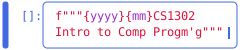
@interact(
    expression=r"'ABC'",
    fill="*",
    align={"None": "", "<": "<", ">": ">", "=": "=", "^": "^"},
    width=(0, 20),
)
def print_object(expression, fill, align="^", width=10):
    format_spec = f"{{:{fill}{align}{'' if width==0 else width}}}"
    print("Format spec:", format_spec)
print("Print:", format_spec.format(eval(expression)))Solution to Exercise 10
It returns a ValueError because align must be specified when fill is.
The newline character is simply regarded as a character. The formatting is not applied line-by-line. E.g., try ‘ABC\nDEF’.
Templating engine
There are more sophisticated methods for embedding dynamic data into string
templates. For instance, the
jinja2 templating engine is
commonly used to generate dynamic web pages and configuration files.
%%hermes --no-context
Explain in a paragraph or two the idea of a templating engine such as jinja2
and why jinja2 is called jinja2.↻ Session: main (ACP: 65e8c84b-751…)
See Also
A templating engine separates content from presentation by letting you write a template with placeholders (and logic like loops and conditionals) and then “render” it by filling those placeholders with actual data — the result is a complete string, HTML page, email, etc. Jinja2 is the most popular templating engine for Python and is used everywhere from web frameworks (Flask, FastAPI) to generating configuration files.
The name Jinja comes from Japanese “忍” (ninja) — the idea being that templates are flexible and “hidden” logic that blends into your content seamlessly. The 2 indicates it was a complete rewrite of the original Jinja 1.x engine, with a new syntax and architecture.
%%hermes --no-context
Briefly explain t-string in Python 3.14 and the motivation of it?↻ Session: main (ACP: 65e8c84b-751…)
See Also
Python 3.14 introduces t-strings (template strings, PEP 750), which are like f-strings but with delayed evaluation — the expressions inside {} aren’t evaluated when the string literal is created, but only when you explicitly call a .render() method on the resulting TemplateString object.
The motivation: f-strings evaluate eagerly, which means f"Error: {expensive_computation()}" runs the computation even if the log message is never shown. T-strings let you defer evaluation until the string is actually needed, making them ideal for logging, i18n/localization, and error messages. They also give better error messages — if a variable is missing, the error is reported at render time with context, rather than silently producing a confusing NameError buried deep in your code.
+can also be used as a unary operator, but it is not very useful.